Quick verdict
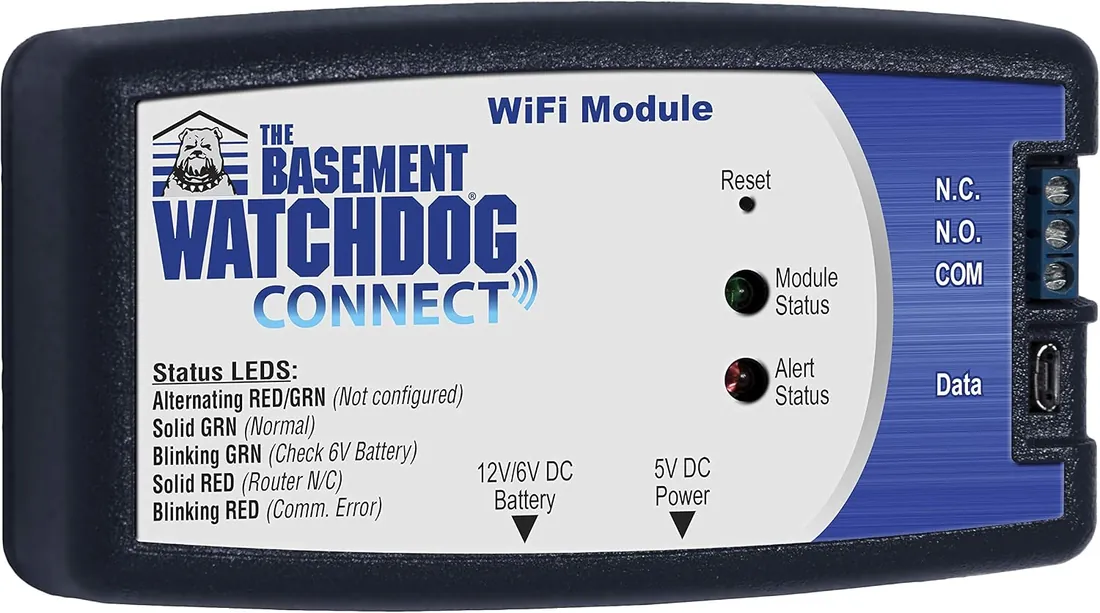
Buy this only if you own, or are buying, a compatible Basement Watchdog backup system: its job is to carry that controller's alarms to your phone. Connected by USB to a CONNECT controller, it names the exact alarm. With extra accessories it can also act as a stand-alone water alarm, but a dedicated Wi-Fi alarm is simpler for that.
Who it fits, and who should skip it
A good fit if
- You have a Basement Watchdog backup system with a data port or dry contacts.
- You want the backup's alarms on your phone while away.
- Your router has 2.4 GHz Wi-Fi and, ideally, a battery backup.
Look elsewhere if
- Your backup pump is another brand.
- You want a stand-alone Wi-Fi alarm with everything in the box.
Specifications
Function
| What it does | Forwards backup sump pump alarms as email, text or push alerts |
|---|---|
| Connection | USB data port or dry contacts (listing); USB-A to USB-C cable (WiFi2 manual) |
| Fees | No monthly or yearly subscription |
Figures: Basement Watchdog WiFi2 Module instruction manual; Amazon listing B072VMVHZL.
Connectivity
| Wi-Fi | 2.4 GHz only |
|---|
Figures: Basement Watchdog WiFi2 Module instruction manual.
Electrical
| Power | 5 V DC ±5% from the backup system controller |
|---|
Figures: Basement Watchdog WiFi2 Module instruction manual.
Options
| High-water accessories | BW-WS float or BW-WS360 sensor, sold separately |
|---|---|
| Stand-alone use | Needs a water sensor plus the USB-A charger 1015016 |
Figures: Basement Watchdog WiFi2 Module instruction manual.
Build
| In the box (WiFi2) | Module, USB-A/USB-C cable, mounting hardware |
|---|---|
| Warranty | 1 year from installation (WiFi2 manual) |
Installation and setup
Basement Watchdog's current manual, written for the WiFi2 version of the module, has you plug the USB-C end of the supplied cable into the module's AUX/USB port and the USB-A end into the backup controller. That cable also powers the module, so the controller itself must be on. Alternating red and green lights mean it is ready; you then join your 2.4 GHz network from a phone, tablet or computer and register an email address to receive alerts. Mount the module with the Velcro or screws, then unplug the backup system from mains power and wait for the AC power lost message to confirm it works.
Compatibility
The module is built for Basement Watchdog systems. The listing says it connects through the data port or the dry remote terminal contacts; the CONNECT controllers with a USB port send the most detailed alerts, naming the exact alarm. It does nothing for other brands of backup pump. Remote alerts during an outage also require a router or modem on its own battery or an uninterruptible power supply. For a brand-neutral option, see the alarms and Wi-Fi monitors guide or the backup pump picks.
Ownership and maintenance
All notification methods start enabled, and at least one must stay on. Learn the two lights: the Wi-Fi light shows the link to your router and the server light shows contact with the alert service. If the server light stays red, power-cycle the module and both power sources. Re-run the outage test each year when you check the backup battery.
Pros and cons
Pros
- Names the exact alarm on a CONNECT controller.
- Email, text and push alerts with no fees.
- Powered by the backup controller over USB.
Cons
- Only useful with Basement Watchdog systems.
- Stand-alone use needs extra parts.
Alternatives worth comparing
Final verdict
The BW-WIFI makes sense for Basement Watchdog backup owners who want the controller's alarms on their phone. Give your router backup power too, or outage alerts will not get out.
Where to buy
Each button opens this exact model's listing. We may earn a commission on tracked links; it never changes what we publish. Disclosure
Questions buyers ask
Does the BW-WIFI work with any backup sump pump?
No. It connects to Basement Watchdog systems through their data port or dry contacts. For another brand, use a stand-alone Wi-Fi alarm or a plug-in monitor that does not depend on the pump maker.
Will I get alerts if the power goes out?
Only if your router and modem stay powered. The maker recommends a router with a built-in battery or a UPS; the module itself runs from the backup system's controller, which keeps working on its battery.
Can the BW-WIFI be used without a backup pump?
Yes, as a stand-alone water alarm, but it then needs a separate water sensor, the BW-WS float or the BW-WS360 pad, plus a USB charger to power it. A dedicated Wi-Fi alarm may be simpler.
Is BW-WIFI the same as the WiFi2 module?
The saved maker manual is written for the WiFi2 module with a USB-C port, while the listing describes data-port and dry-contact hookups. Check which controller you have and which connection it offers before buying.